Skip to content

The first on-device meeting coach

You cannot spot your own pattern.You were busy talking.

HuddleOwl coaches you through the call, then scores how you ran it, quoting the line from the transcript that earned every score.

Apple Silicon, 164 MB  ·  free forever for individuals  ·  v0.1.9

Live coaching
Coaching cards arriving during a live sales call while the signal scores move alongside them

Cards arrive while you are still talking. Every one of them quotes the line that triggered it.

23
languages
transcribed on device
0
bytes uploaded
ever, in local mode
~40s
to a scored brief
from hang up
$0
in API costs
running fully local
100+
AI providers
or bring your own endpoint

The difference, in one block

One of these tells you what happened.The other tells you what to do.

Your notetaker

Discussed pricing and timeline. Client raised some budget concerns. Agreed to follow up next week.

Accurate. Also unusable.

HuddleOwl

  • Next step1/5

    Call ended on “let’s stay in touch”. No date, no owner.

  • Objection2/5

    “It’s a lot for a team our size” went unanswered.

  • Discovery3/5

    You moved to price 40 seconds after they said “budget”, and never came back to what the delay costs them.

Practise this nextAsk what a problem costs before you price the solution.

A notetaker makes the meeting legible. HuddleOwl makesyou better at the next one.

Also a notetaker

Every AI meeting note you expect.None of the per-seat bill.

HuddleOwl is not instead of your notetaker. It is one, and then it keeps going. Transcript, summary, decisions, action items with owners, a follow-up email in your voice: all of it, on a machine you already own, for nothing per call.

  • Full transcript, both sides23 languages, no bot in the participant list
  • A summary with a verdictnot four paragraphs restating the call back at you
  • Every decisionpulled from the whole transcript, including the first five minutes
  • Action items with ownersand the date, when the call gave one
  • A follow-up emaildrafted in the tone you picked, ready to send
  • The next step as a calendar inviteone click, straight into your calendar
  • Full-text searchacross every transcript, cue and email you have ever run
  • Import a recording you already havesame notes, same scoring, no live call needed
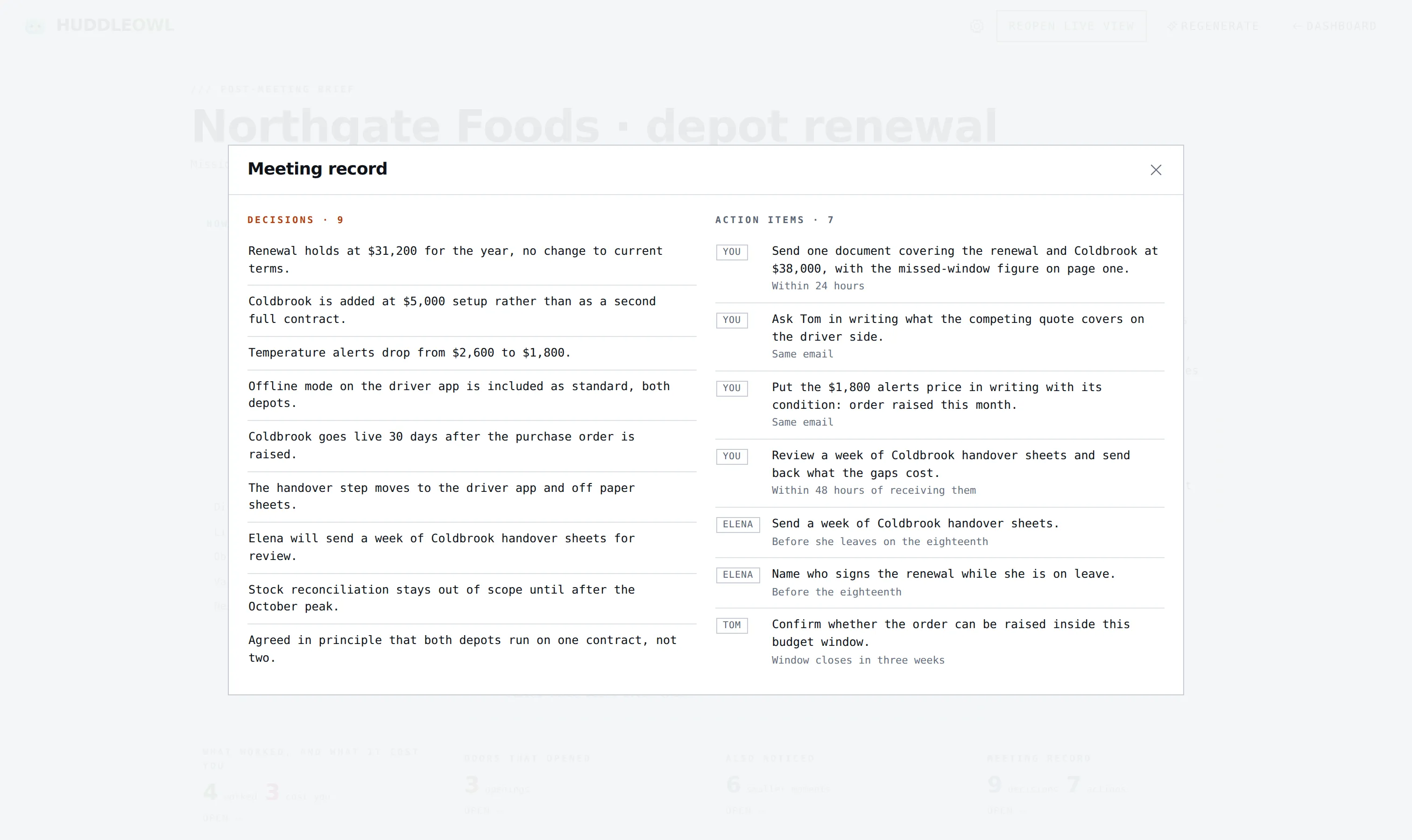
Meeting record
The meeting record: nine decisions and seven action items with owners, gathered from the whole call

Nine decisions and seven owned actions out of one call, including the ones settled before anybody had opened a notes app.

Notes elsewhere

$170 to $240

a year, per seat, for the transcript and the summary. Every call goes to somebody else's server to get there.

Notes here

$0

in API costs, on device. No per-minute transcription, no per-token summary, no per-seat markup. And then it scores how you ran the call, which none of them do.

While you are talking

Coaching that arrivesin time to use it

A note you read tomorrow changes nothing about today. HuddleOwl watches both sides of the call as it happens and puts a card in front of you when there is something to do about it: a question you skipped, an objection you talked past, a buying signal you did not pick up. The signal scores move as the call moves, so you can see it slipping before it has slipped.

Both sides, no bot
Native system audio on macOS, loopback on Windows. Nothing appears in the participant list.
Cues that quote the call
A cue that cannot point at the line it reacts to is discarded before you see it. That rule lives in the backend, not in a prompt.
Your tone
Direct, supportive, friendly or blunt. The coaching sounds like something you would actually take.
HuddleOwl
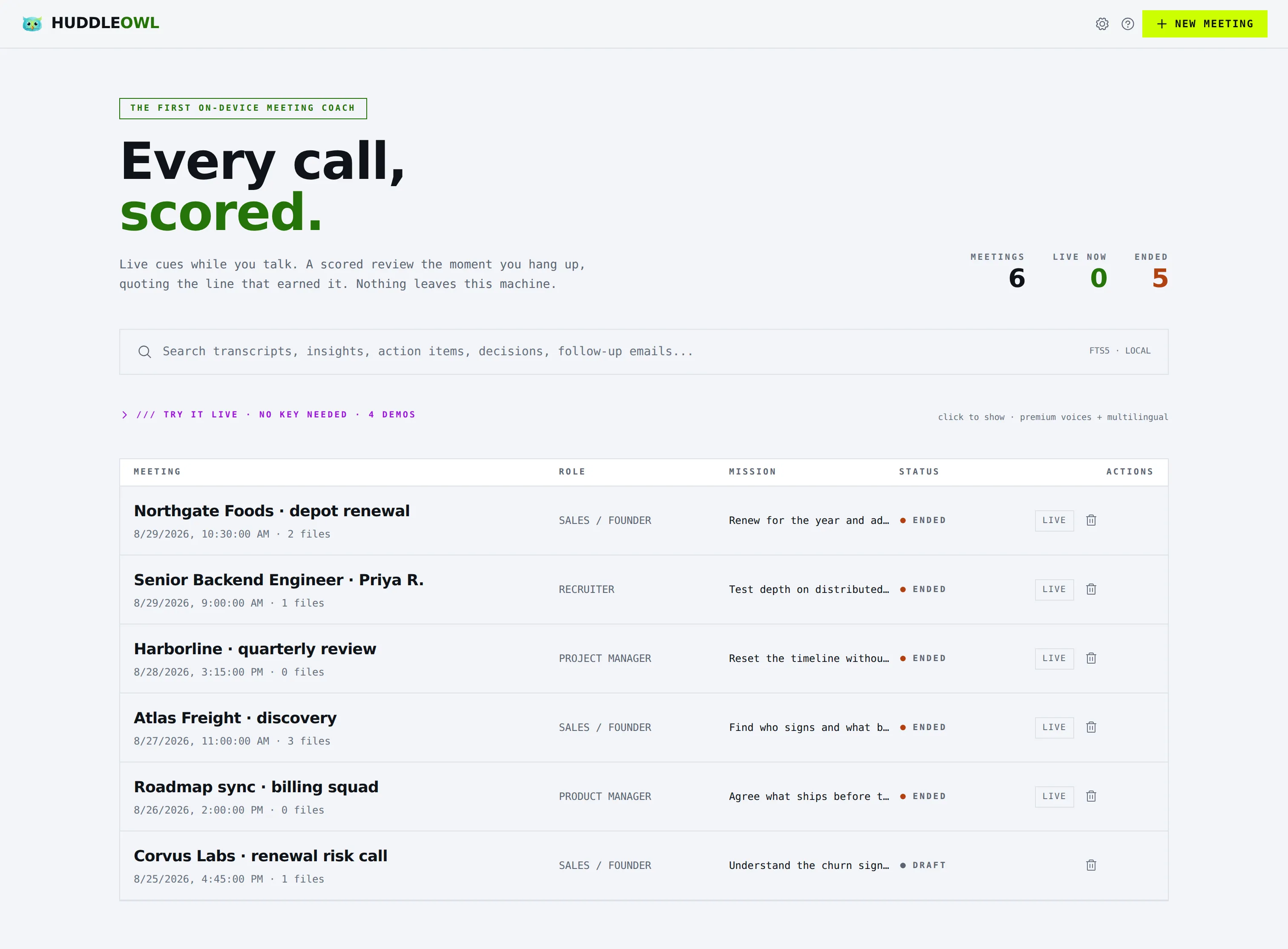
The meetings list: every call with its role, its mission and its status, above a full-text search box
Every call you have run, with the mission you set for it. The search box is full text across transcripts, cues, decisions and follow-up emails, and it runs on your own disk.

About 40 seconds after you hang up

The review a QA lead would write,on every call you take

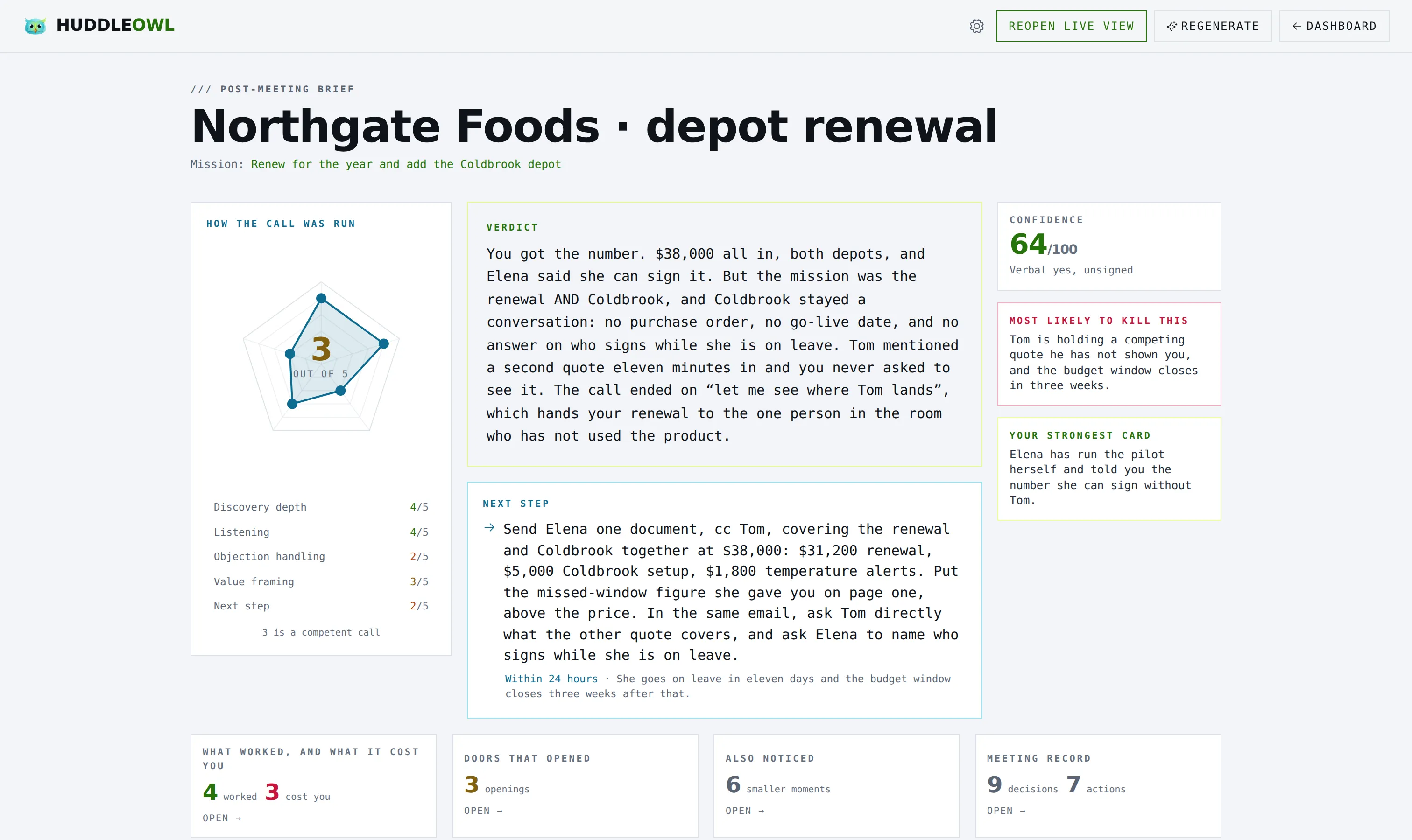
Not a summary. A scored rubric for the role you were playing, a verdict, and the one next step that matters. Sales is graded on discovery depth, listening, objection handling, value framing and next step. PM, recruiter and product each get their own. A dimension the call never tested is left unscored, never quietly given a zero.

Post-meeting brief
The post-meeting brief: rubric scores, the verdict, the one next step, and four tiles waiting to be opened
One screen, no scrolling. The scored rubric, the verdict, and the one next step. Everything else is a tile you open.

It reads the entire call

Most tools summarise whatever fits in one context window, which on a 40 minute call means the last few minutes and a confident tone. HuddleOwl map reduces the whole transcript, and the chunking never splits a speaking turn, so a quote is never half a sentence.

Post-meeting brief
Each of the four tiles on the brief opening and closing in turn while the page underneath stays still
Four tiles, opened and closed. The page underneath never moves.

The part that makes it trustable

Every score carriesthe sentence that earned it

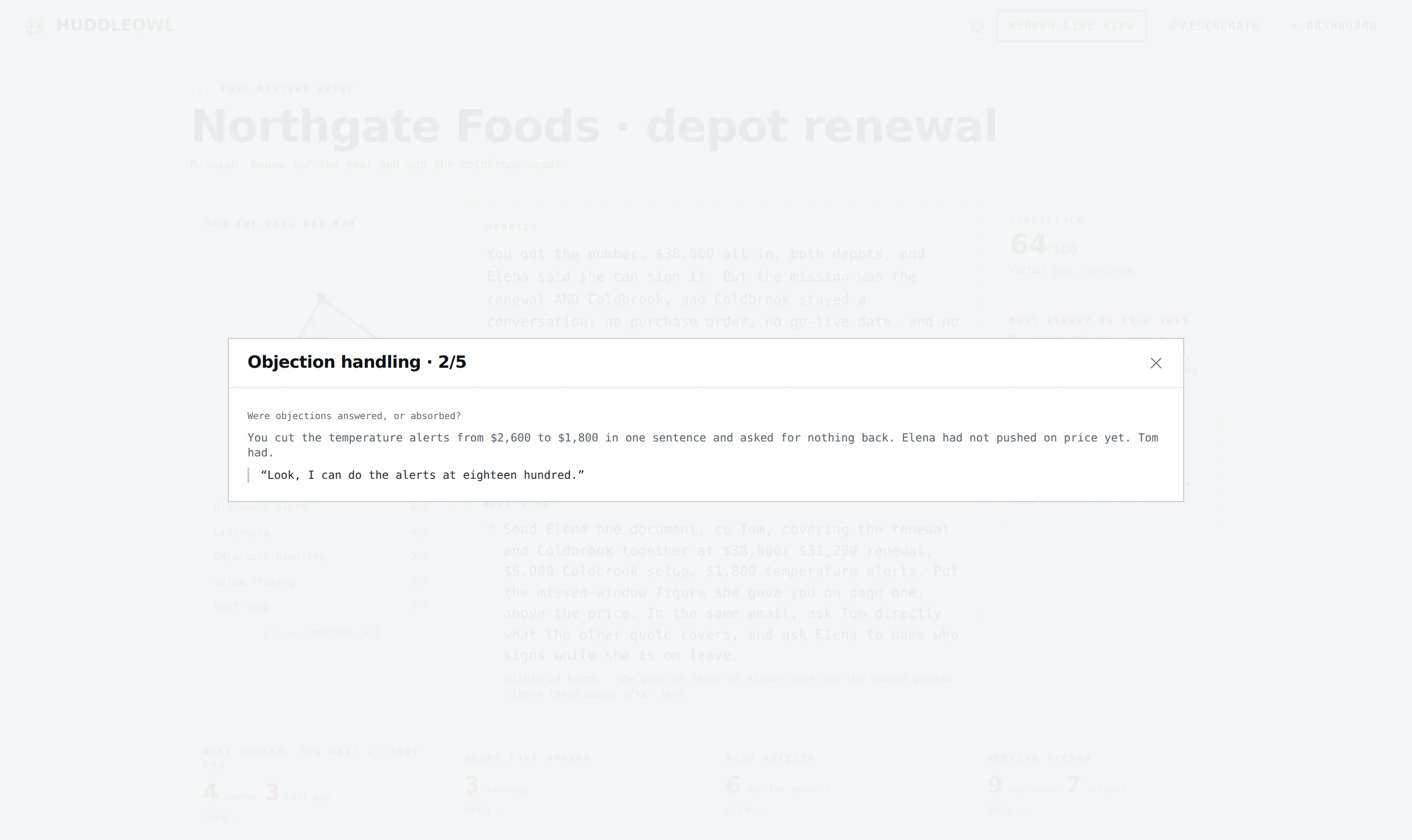
The scorecard does not tell you to work on discovery. It says 3 out of 5, and here is the line you said. Click any dimension on the web and it opens the reason and the quote. You can disagree with a score, which is the whole point. You cannot disagree with a transcript.

Every score carries its evidence
Clicking a rubric score opens the reason for it and the exact line from the transcript that earned it
Every dimension on the web is a button. What it opens is the reason and the line.

Visible to you, invisible to screen share

Coaching nobody elsein the call can see

Not dimmed, not minimised. The overlay does not appear in the recording, the Zoom share or the Loom. Clicks pass straight through to whatever is underneath, so you keep working with it sitting on top, and Cmd Shift H brings it back from anywhere if you lose it.

Stealth mode
Switching stealth mode on: the window turns see-through over the app behind it and the palette drops to white on black
Switching it on. The window goes see-through, the palette drops to the highest contrast pair it has so the text survives the blend, and clicks start landing on the app underneath.
Stealth mode
Stealth mode held still at 50 percent opacity, the cue feed and scores readable in white on black with the desktop showing through

Held still

At 50% over an unknown desktop a themed palette composites to a smear, so the whole app drops to the highest contrast pair it has: white on black. The translucency slider and the click-through toggle sit next to the badge, and the mode costs no other space. On a window narrow enough to park beside a call, every row still belongs to the call.

No account. No API key. No network.

The whole thing runswith the wifi off

Live transcription, live coaching, the brief, the follow-up email. Download a model once and HuddleOwl needs nothing from anyone. This is not a degraded offline mode: same rubric, same evidence quotes, roughly 40 seconds to a brief.

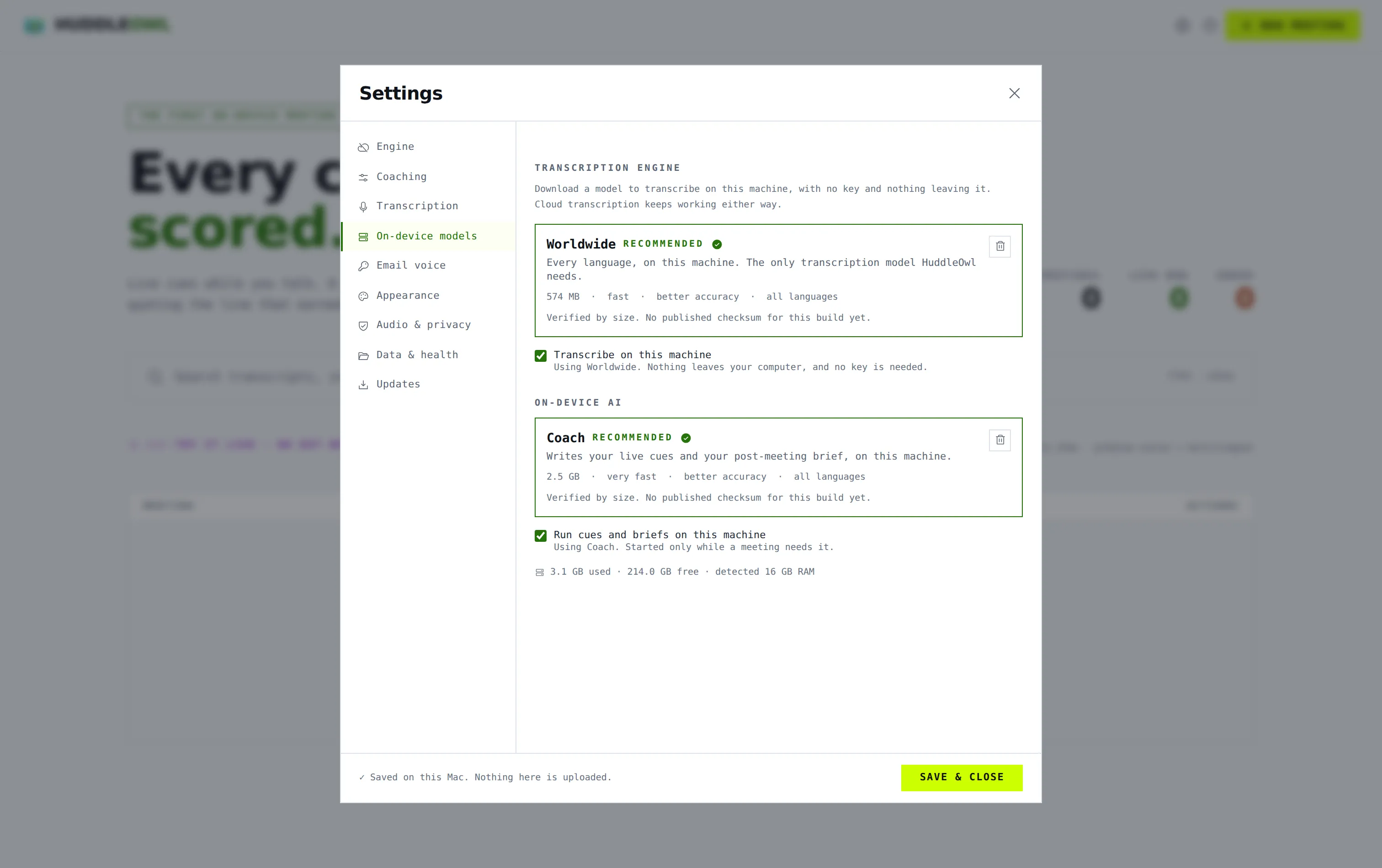
Settings, on-device models
Settings showing both on-device models installed, with transcription and coaching switched to this machine
Two models, both downloaded, both engines switched to this machine. From here the app needs nothing from anyone.

Where this is true today

The on-device engines ship on macOS. On Windows, HuddleOwl runs against a cloud model of your choosing while the local engines are being built. This page will say so the day that changes, and not before.

Or bring your own

Prefer a cloud model anyway? Point HuddleOwl at over 100 providers or at your own endpoint and pay your provider directly. There is no per-seat AI markup from us.

Where it sits

The whole category,in one table

Read the four locked rows and the two coaching rows together. Nobody else has both columns.

Swipe the table sideways to see the rest.

CapabilityHuddleOwlOtterGranolaFirefliesMeetilyHyprnoteCluelyGong
In the call
Nothing joins the callYesNoYesNoYesYesYesNo
Captures both sides locallyYesNoYesNoYesYesYesNo
Live transcriptionYesYesYesYesYesYesYesYes
Coaching cues during the callYesNoNoNoNoNoYesPartial, or paid tier only
Every cue quotes the exact lineYesNoNoNoNoNoNoNo
Hidden from screen shareYesNoNoNoNoNoYesNo
After the call
Post-call summaryYesYesYesYesYesYesYesYes
Scores how you performedYesNoNoNoNoNoPartial, or paid tier onlyYes
Evidence quote behind every scoreYesNoNoNoNoNoNoPartial, or paid tier only
Role-specific rubricsYesNoNoNoNoNoNoPartial, or paid tier only
Coaching tone presetsYesNoNoNoNoNoNoNo
Follow-up email drafted for youYesPartial, or paid tier onlyYesYesNoNoYesYes
Next step to calendar (.ics)YesNoNoNoNoNoNoPartial, or paid tier only
🔒 Where your call lives
Runs 100% on your machineYesNoNoNoYesYesNoNo
Works with no internetYesNoNoNoYesYesNoNo
Works with no accountYesNoNoNoYesYesNoNo
Delete a folder, it is all goneYesNoNoNoYesYesNoNo
Bring your own AI keyYesNoNoNoYesYesNoNo
Choose your own modelYesNoNoNoYesYesNoNo
Import an old recordingYesYesNoYesYesNoNoYes

full support  ·  partial, or paid tier only  ·  not available. Compiled from public information, August 2026. Verify anything you plan to rely on.

What one person pays, per year

List price for a single seat, before any annual discount.

HuddleOwl
Free
Hyprnote
Free
Meetily
Free, or about $120 for Pro
Granola
about $168
Otter / Fireflies / Fathom
about $168 to $240
Cluely
about $240
Gong
about $1,200 to $1,800

On device you pay nothing per call: no per-minute transcription, no per-token coaching. Prefer a cloud model? Bring your own key and pay your provider directly. There is no per-seat AI markup from us.

Who it is for

Built for the person on the call,not the person reading about it

Founders selling their own product

Nobody is listening to your calls. Nobody is going to tell you that you priced in the first four minutes, again.

Solo sellers and consultants

The coaching a sales manager gives, without the sales manager, and without a recording going to a vendor.

Recruiters and hiring managers

Scored on role fit, ownership signal, skill confidence and red flags, with the answer that earned each one.

Anyone who cannot let a call leave the room

Legal, health, HR, anything under an NDA. The wifi can be off and nothing about the coaching changes.

How it works

Three steps,and none of them is a sign up

  1. 01

    Download and open

    No account, no email, no key. It opens straight into the app and asks you nothing.

  2. 02

    Set a mission

    One line about what this call needs to achieve. That single line is what you get scored against.

  3. 03

    Take the call

    Cues while you talk, and a scored brief about 40 seconds after you hang up.

Free forever

Free, forever, for individuals.Teams pay for teams.

Not a trial and not a freemium ladder. If you use HuddleOwl for your own calls, it is yours. No card, no account, no seat count.

Apple Silicon, 164 MB  ·  free forever for individuals  ·  v0.1.9

macOS says the app is damaged. What now?

HuddleOwl is not notarised with Apple yet, which is a signing formality rather than anything about the build. Run this once in Terminal, then open it again:

xattr -cr /Applications/HuddleOwl.app

Notarisation is on the list.

For teams

Using this with a team?

HuddleOwl is built for one person on one machine, and that is the version that exists today.

Shared rubrics, team benchmarks and an admin view are things we will build when enough teams ask for them, not before. If that is you, tell us what you actually need and we will come to you first.

We read every one of these. No sequence, no drip, no reselling your address.

FAQ

The questionspeople actually ask

Does anything join my call?

No. There is no bot, no extra participant and no calendar connection. HuddleOwl listens to your microphone and your system audio on your own machine, so nobody on the call sees anything different.

Does my audio leave my machine?

On a Mac with the on-device models selected, no. Nothing, at all, including when the wifi is off. If you choose a cloud model instead, your transcript goes to the provider you picked, using your key, and never passes through us.

Is it really free?

Yes, for individuals, permanently. No card, no trial clock, no feature held back to sell you later. Teams will eventually pay for team features that do not exist yet.

What about Windows?

The app runs on Windows 10 and 11 and captures both sides of the call through loopback audio. The on-device engines are macOS only today, so on Windows you currently point HuddleOwl at a cloud model of your choosing. Windows local engines are being worked on, and this page will say so the day they land.

Which models does it run?

A Whisper-family transcription model and a local coaching model, both downloaded once from inside the app. Together they are about 3GB and want 8GB of RAM. Or point it at any of 100+ cloud providers, or at your own endpoint.

Is stealth mode above board?

It hides the coaching overlay from your screen share so the person you are talking to does not watch you being coached. It does not hide that you are recording, and it does not touch anything on their side. Recording law is yours to follow where you are.

Where is my data kept?

In a folder on your disk that you can open from inside the app. Transcripts, cues, briefs and draft emails all live there. Delete the folder and there is nothing left anywhere, because there is no server holding a copy.

Can I import an old recording?

Yes. Drop in an audio file you already have and it comes back with the same transcript, the same rubric and the same evidence quotes as a live call.

Why does macOS say the app is damaged?

Because HuddleOwl is not notarised with Apple yet, which is a signing formality rather than anything about the build. Run xattr -cr /Applications/HuddleOwl.app once in Terminal and open it again. Notarisation is on the list.